
The History of Pocket PC and Windows Mobile Platforms. With Promo coupon codes
This article has been just updated:
Looking at the current mobile landscape, one wouldn’t think that Windows once used to be a dominant mobile platform with a promising future. Let’s take a trip down the memory lane and go back to the days of Pocket PC and Windows Mobile platforms.
Microsoft is known for confusing product names (just look at the Microsoft Office product line and products like Office 2019, Office 365, and Microsoft 365), so we should begin our brief overview of the history of Pocket PC and Windows Mobile by clarifying a few terms.
Pocket PC was a term used by Microsoft to describe a personal digital assistant (PDA) running the Windows Mobile operating system. However, the first two versions of Windows Mobile were confusingly called Pocket PC 2000 and Pocket PC 2002, so some Pocket PC devices were running Pocket PC as their operating system.
Windows Mobile, as we remember it today, debuted in 2000 and was based on Windows CE 3.0, a member of the Windows family of operating systems intended for embedded products. Microsoft envisioned Windows Mobile as the portable equivalent of its desktop operating system.
Most Windows Mobile devices included a similar set of features, such as multitasking, user-accessible file system, internet browser, office suite, media player, virtual private networking, and email. They were intended mainly for business and enterprise customers, allowing them to be productive and connected anywhere and at any time.
The era of Windows Mobile ended in 2010, with Microsoft’s decision to focus its efforts on Windows Phone, a family of mobile operating systems intended to compete with iOS and Android. In total, Microsoft released eight major versions of Windows Mobile.
A year after the release of Windows Mobile 6.5, Microsoft released Windows Phone 7 as its non-backward compatible successor that was meant to unify the desktop and the mobile world. Since their launch, Windows Phone devices struggled to compete with their Android and iOS alternatives, so it didn’t come as a surprise when Microsoft announced that support for Windows 10 Mobile would end on December 10, 2019.
Featured sale deals & coupon promo codes on software companies are right here:
Parallels is the company based in Washington dealing with creation of the virtual representations of applications and the software programs used in MacOS platform. The company has over 800 employees with several offices in 15 states all over the world. The company aims at creating a product for the Mac users to access and use data applications from any device. Are you interest in Parallels products?
Find Parallels coupon codes here.
Intego is the number one leading antivirus offering exclusive mac security. Intego is the product that has attracted Mac users’ attention globally. Intego antivirus has emerged to be the award-wining network security. Intego has the parental control software feature made exclusively for the MacOS and the mac OS X device.
Are you interested with this amazing product? Follow https://www.coupon-karma.com/intego/ to gain more.
Prosoft Engineering Inc has a software that helps in undeleting your important files, creation of backups, monitoring of the computer and the detection of the malware. All the services are available in one excellent package that mazes everyone. If you need data rescue service then you can take a simple step of click on this link https://www.coupon-karma.com/prosoft-engineering/
AVG is the most reputable online threat protector. It has more than 200 million active users. All most every computer user in the world is counting on the AVG products and services to improve their performance and upgrade their privacy and protection skills. You definitely need some best AVG coupon codes to save more from the purchase.
Stellar Information Technology Private Limited was founded in the year 1993. The company offers a wide range of data recovery solutions to its users. Stellar data recovery has never stopped making data retrieving concept smart and the hope instilling moments for those who lost the data. You need one software from Stellar Information Technology Private Limited, find out here https://www.coupon-karma.com/stellar-information-technology-private-limited/
Top 7 Best Pocket PC and Windows Mobile Devices of All Time
Many of the features we enjoy on our Android and iOS smartphones today can be traced back to Windows Mobile devices, as our selection of the top 7 best Pocket PCs of all time demonstrates.
Operating system: Windows CE 3.0
 Compaq used to be a huge name in the PDA world before it was acquired by Hewlett-Packard, offering many IPAQ-branded color touch-screen devices running Microsoft’s Pocket PC 2000 operating system and its successors. The Compaq iPAQ Pocket PC H3870 occupies a special place in history because it was the first handheld in the world to offer built-in Bluetooth connectivity. It also had an SD card slot, 206 MHz Intel StrongARM processor, 64 MB of RAM, and 32 MB of ROM. With the backlight turned off, the Compaq iPAQ Pocket PC H3870 managed to run for approximately 10 hours on a charge, which was quite an achievement at the time.
Operating system: Windows Mobile 5.0
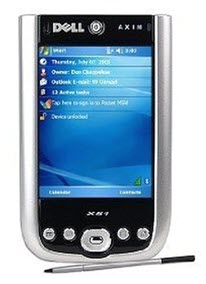 The Dell Axim X51v was a very popular high-end consumer-market Pocket PC. Compared with other devices in the same category that were available in 2005, it featured a sleek design and a relatively compact construction that encouraged its users to carry it with them everywhere. Its specification sheet mentions Intel XScaleTM PXA270 processor running at 624 MHz, Intel 2700G multimedia accelerator with 16 MB video memory, 336 MB of memory (256 MB flash, 64 MB SDRAM), Bluetooth 1.2, and Wi-Fi 802.11b. Using an optional adapter cable, it was possible to connect the Dell Axim X51v to the VGA input port of a monitor—something only a few smartphones can replicate today.
Operating system: Windows Mobile 5.0
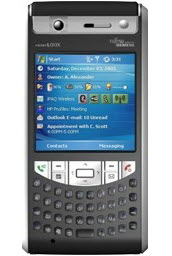 Released in August 2006, the Fujitsu Siemens Pocket LOOX T830 quickly became one of the most well-received Pocket PCs with the Windows Mobile 5.0 operating system. Its main attraction was a GPS module with a highly sensitive SiRFstarIII chip that guaranteed excellent signal reception even in densely populated urban areas. The Fujitsu Siemens Pocket LOOX T830 also supported 3G connectivity and offered a 2 MP camera with autofocus. Reviewers at the time criticized its bulky construction, large weight, and low-resolution display. Users in regions where 3G coverage wasn’t excellent also complained about the lack of EDGE connectivity.
Operating system: Windows Mobile 6.0
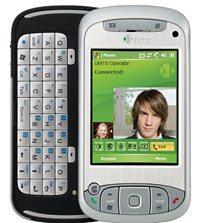 The HTIC TyTN combines a resistive touchscreen with a left-side slide-out QWERTY keyboard to offer the most suitable input method for every application. Being a quad-band GSM phone, the HTC TyTN ensured excellent internet connectivity and strong signal reception. BlackBerry-partnered carriers equipped the device with BlackBerry services and applications, which complemented Microsoft’s own instant messaging, web browsing, and email solutions. Interestingly, the HTC TyTN is equipped with a GPS receiver that doesn’t have a GPS antenna connected to it, and GPS is disabled both in ROM and on the circuit board.
Operating system: Windows Mobile 6.1
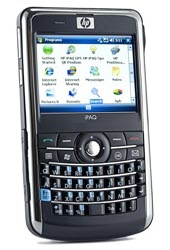 After Hewlett-Packard acquired Compaq in 2002 for $25 billion, the new owners decided to keep releasing Pocket PCs under the brand iPAQ. One particularly noteworthy device from that era is the HP iPAQ 910c, a quad-band GSM phone running Windows Mobile 6.1 and offering a full QWERTY keyboard in a relatively compact body, although it didn’t seem all that compact in comparison with the original iPhone, which Apple released the previous year. This decidedly messaging-centric smartphone became particularly popular among professionals despite being criticized for its slower performance and poor speaker quality.
Operating system: Windows Mobile 6.1
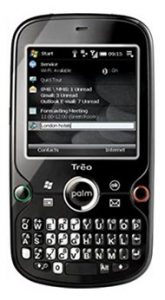 Replacing the short-lived Sprint Treo 800w, the Palm Treo Pro represents the end of the era of QWERTY keyboards. It arrived the same year as the iPhone 3GS, which meant that Apple had enough time to polish its virtual keyboard and grow its ecosystem of third-party applications. 2009 also saw the release of the Motorola Droid, an Android smartphone with a sliding QWERTY keyboard and a 3.7-inch 854×480 display. In comparison, the display on the Palm Treo Pro had only 320 x 320 pixels and a very multimedia-unfriendly aspect ratio of 1:1. Still, the device perfected everything Windows Mobile users loved about the system. To this day, many of them long for the return of smartphones like the Palm Treo Pro.
Operating system: Windows Mobile 6.5
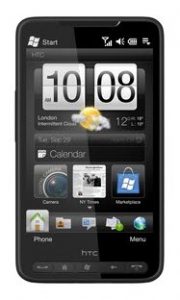 Most smartphones arrive without much hype and disappear from the shelves just as quietly, but not the HTC HD2. This legendary smartphone offered a very compelling alternative to the iPhone because it featured a 4.3-inch capacitive touchscreen with a resolution of 480 x 800 pixels, Qualcomm QSD8250 Snapdragon S1 chipset, 448 MB of RAM, and 5 MP camera with dual-LED flash. The device first shipped with Windows Mobile 6.5, the massive community that quickly sprung up around it ported practically every other mobile operating system, including Android, MeeGo, and Windows Phone 7.
The era of Pocket PC and Windows Mobile devices may be over, but their legacy lives on. Only time will tell if Microsoft decides to enter the mobile market again with a new operating system and provide mobile users with an alternative to Android and iOS.